Wednesday, 9 May 2012

Tips for Choosing Best Online EMR


Making the right EMR purchase the first time can be a positive experience! Keep in mind successful electronic medical record implementation will enhance your practice and improve patient care. Even if you have shortlisted the list between desktop and online EMR, selecting a best online EMR for the practice or hospital is not an easy task.

Software selection tips that can help to choose a best online EMR for the practice (or hospital):

1. Have your current and near future practice needs been defined?

    * Does the EMR interface with your billing or practice management systems?
    * Is your practice's record management methodology supported?

2. Before you purchase your EMR...

    * Compare a number of EMR systems
    * Focus on EMR systems that best fit your needs

3. Which EMR technology do you need?

    * A client-server EMR software or a web based EMR software solution
    * Does the EMR allow and support for practice growth

4. Can you get an EMR software demo?

    * Is it specialty specific
    * Is it as easy to use on complex patient cases

5. How complicated is the EMR to use?

    * Are the EMR document templates customizable?
    * Will the electronic medical record solution save your office staff time?

6. How easy is office implementation?

    * Easy and shared access among providers and staff
    * How disruptive implementation will be to your practice

7. What electronic medical record features are supported?

    * Charge capture for billing?
    * Voice recognition
    * etc, etc, etc.

8. Is the EMR solution technologically stable, compatible and flexible?

    * Is the electronic medical record solution 'certification focused'?
    * Is it stay within HIPAA compliance for privacy standards and confidentiality?

9. What is the actual cost of electronic medical record ownership?

    * Cost for EMR hardware/software license, installation, training, upgrades and maintenance
    * Is there an EMR software efficiency cost savings from successful office implementation?

10. After you purchase your software system, what then?

    * Is there reliable continuing EMR software vendor support and training?
    * Are EMR customizations easily available?

Taking into consideration the above mentioned selection tips would help to make a right decision as regards best EMR / best online EMR for the practice.

Wednesday, 25 April 2012

Advantages of HIPAA Compliant Solutions


 The pressure on the healthcare industry across the world including US is on the rise as regards delivery of better quality of patient care and to bring about reduction in costs. Medical IT solutions like claims processing system, practice management software, EMR (electronic medical records), EHR (electronic health records), etc. are proving to be handy in achieving the above goal. The technology is helping to make life easier for doctors, hospitals as well as patients. However, the problem being there are a large no. of vendors offering a wide range of medical IT solutions. A particular system may be suitable for the practice and other may not. In absence of some sort of standardization and guidelines the optimal results can not be expected. Here, comes the role of HIPAA compliant solutions that are developed as per the HIPAA guidelines and set of rules.

HIPAA stands for “Health Insurance Portability and Accountability Act”, the act was enacted in 1996. Title I of HIPAA protects health insurance coverage for workers and their families when they change or lose their jobs. Title II of HIPAA, known as the Administrative Simplification (AS) provisions, requires the establishment of national standards for electronic health care transactions and national identifiers for providers, health insurance plans, and employers. Basically HIPAA is a regulatory body that provides guidelines as one of its functions as regards the development of healthcare IT systems ultimately known as HIPAA compliant solutions.

HIPAA compliant solutions provide a no. of safeguards as against a non-HIPAA compliant / un-standardized healthcare IT system:

1) Administrative Safeguards - policies and procedures designed to clearly show how the entity will comply with the act.

2) Physical Safeguards – controlling physical access to protect against inappropriate access to protected data.

3) Technical Safeguards – controlling access to computer systems and enabling covered entities to protect communications containing PHI transmitted electronically over open networks from being intercepted by anyone other than the intended recipient.

Information systems housing PHI must be protected from intrusion. When information flows over open networks, some form of encryption must be utilized. If closed systems/networks are utilized, existing access controls are considered sufficient and encryption is optional. And many other guidelines that ensure safety and security of data, standardization of system by introducing functional features and so on.

If we sum up, HIPAA compliant solutions ensure better safety and security of data, standardization, functional features and inclusion of other privacy policy / procedures that can be helpful in achieving the optimum utilization of the system.

Wednesday, 4 April 2012

How to Choose a Right EMR Solution


The importance of EMR solutions in today’s hi-tech environment can not be denied. It is believed by industry experts that he who denies the adoption of newer technology has to pay for it in terms of excessive time consumption, poor productivity and unreasonable ROI. It is also believed that if a right EMR solution is chosen and implemented, it will not only benefit doctors but to the patients as well to a great extent.

The process of choosing a right EMR solution starts with documenting the current office work flow that supports the patient encounter. This is a tedious, iterative and time consuming process that is critical to the success of any electronic medical records implementation. Document exactly what happens when a patients sees a doctor. What forms do they fill out? What happens to those forms? Are they sent to other departments? What systems is data entered into? Who are the people involved and what do they do to move the process forward? Every detail, process, form, system, technology and person involved in the process has to be properly documented to fully understand the work flow of a patient encounter. This process involves many iterations and every person that is involved in the process before a complete understanding is gained.

Once the work flow is documented, a list of vendors needs to be prepared who provide with the certified EMR solutions. On preparing the list, the requirements of the practice must be compared with the features of the respective electronic medical records solution. The factors also need to be considered such as reviews about shortlisted vendors, pricing, long term support and so on.

Monday, 5 March 2012

Desktop vs. Web Based EMR


Based on HIMSS reports for the last few years, there has been rapid pace in the adoption of EMR technology. However, a question that often disturbs is a choice between desktop and web based EMR.

Practically over a period of time everything has gone “wired”, no field is an exception to the rule. EMR’s came into existence with the desktop versions, however, looking into the widespread advantages of internet, web based EMR’s have come into existence. The biggest advantage a web based EMR would provide over a desktop version is that the data is stored centrally and the information can be accessed from any where and at any point of time. 

Another major difference between desktop applications and web based EMR software can be seen in the cost. Web-based applications are simply less expensive when compared to desktop applications. Web based applications can be used on subscription basis, which keeps out of pocket expenses low. Using web based EMR software will help you keep your startup costs to the minimum. Added to that, web based EMR software requires no investment in upgraded hardware. Thus, your IT maintenance costs will come down drastically with web based EMR software.

Tuesday, 28 February 2012

Major Benefits of Electronic Medical Records


EMR (electronic medical records) is all set to transform the healthcare industry. The application can deliver unmatched benefits to both doctors as well as patients. Here are the major benefits of electronic medical records:

1. Electronic medical records can be easily stored as electronic files in secure locations. The history of the patients, the notes of the practitioner, facts, statistics and figures can be stored at the same place without occupying a large physical area.

2. The electronic medical records stores very large amount of information. This makes the process of management very easy. When the documents and records have to be searched later for some use, the electronic method is the easiest. It cuts all the hassle that was involved in looking and searching the bulky records and files for hours and hours. Thus it saves a lot of time.

3. The professionals and the practitioners associated with the health care industry reaps huge benefits from the EMR transcription records when it comes to urgent situations. Unlike the earlier times, the history of the treatment and the prediction and detection of problems becomes very easy and fast and this can saves the patient from the adverse affects of prolonged medical condition.

4. When it comes to operations, where all the information if required at the tips, the electronic records or electronic medical transcription can be gained access with a few click of the mouse. This saves a lot of bother on the part of the practitioner and she/he can therefore concentrate better on the real tasks.

5. The older forms of storage of medical records saw the piling up of records in no time and therefore it was very difficult to clean the space and remove all the unnecessary records. With the electronic medical records, it is easy to manage the medical documents and the unnecessary records can be easily deleted to ensure that the storage space has only the required information.

6. The electronic medical records create the conditions for easy analysis of the medical records which would otherwise have been a very tedious job. All the statistics and analysis can be done with a few clicks of mouse. This also helps in the growth and betterment of the health care organization or clinic.

7. The electronic storage of the data is very cheap as compared to the large amount of paper work that was required traditionally. The storage space is very cheap and so is its maintenance, no more bulky cabinets and congested offices.

Thursday, 2 February 2012

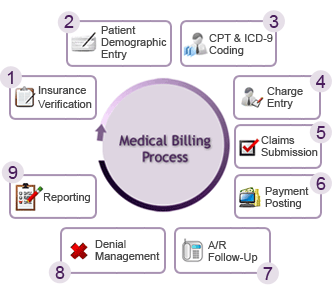
Medical Billing Services Management


Medical Billing Services Management:

Truly speaking, the healthcare industry is burdened with a large volume of paperwork. Many medical professionals claim they spend more time filling out forms than actually treating patients. A large portion of the endless pile of paperwork is related to coding, submitting and processing medical claims related to physician or medical billing.

With no end in sight to the volume of paperwork associated with managing a medical practice, more and more practices are outsourcing their billing function to third party companies. In this article we take a closer look at medical billing in general, issues related to medical billing and the types of service providers offering medical billing as a third party service.

Generally speaking, medical billing services management is the process of facilitating payment from patients and insurance carriers on behalf of healthcare providers. More specifically, billing refers to the process of submitting medical claims to medical insurance carriers and patients in order for healthcare providers, to receive payment for services rendered. In addition to submitting claims for payment, medical-billing includes the service of following-up on denied or non-adjudicated medical claims in order to rectify payment errors or total lack of payment.

Medical billing services management or billing management software can plays a crucial role in the overall process of medical invoicing.

HIPAA Compliant Solutions


HIPAA stands for "the Health Insurance Portability and Accountability Act". The HIPAA law was enacted to improve the efficiency and effectiveness of the American health care system. The law includes administrative simplification provisions to establish standards and requirements for the electronic transmission of certain health care information. It also requires organizations exchanging information for health care transactions to follow national implementation guidelines.

HIPAA compliant solutions are based on HIPAA policies and hence ensure availability of  required security and safety features. There needs to be certain standardization as regards functionality as well, HIPAA compliant solutions ensure presence of certain essential features that are must for streamlining the overall processes. Hence, in a market where there are numerous vendors with a wide range of healthcare software, HIPAA compliant solutions offer better option.